Electrolytic capacitors are among the first components to fail on aging PC hardware and game consoles because their liquid electrolyte slowly dries out or leaks under heat and ripple current stress.[web:16][web:25] Identifying the critical parts, choosing modern low-ESR or polymer replacements, and using correct soldering technique can restore long-term stability and often completely revive “dead” boards.[web:4][web:15]
Which Caps Age First?
The lifetime of aluminum electrolytics is strongly temperature‑dependent: a common design rule is that lifetime roughly doubles for every 10 °C drop in core temperature, so the parts running hottest are the first to fail.[web:16][web:22][web:28] On mainboards this is typically the CPU VRM output and input caps around the socket, any caps squeezed between MOSFET heatsinks, and the chipset or RAM regulator areas.[web:25]
On GPUs, the highest stress parts are the low‑ESR bulk caps on the core and memory rails and any small electrolytics near the PCIe power input; these sit in high‑ripple, high‑frequency switching environments and run much hotter than general I/O filtering caps.[web:4][web:29] In ATX PSUs, the primary bulk cap and secondary 12 V/5 V output filters are the usual wear items, which is why PSU recapping has its own dedicated best‑practice guidelines.[web:25]
Retro consoles have well documented “cap rot” patterns: early original Xbox revisions famously use a clock supercapacitor that almost always leaks and corrodes traces, and is best removed pre‑emptively.[web:31][web:34][web:40][web:37] Handhelds like the Sega Game Gear are also known for leaking SMD electrolytics on the main, audio, and power boards, and many repair guides recommend a full recap as the first step.[web:35][web:41][web:44]
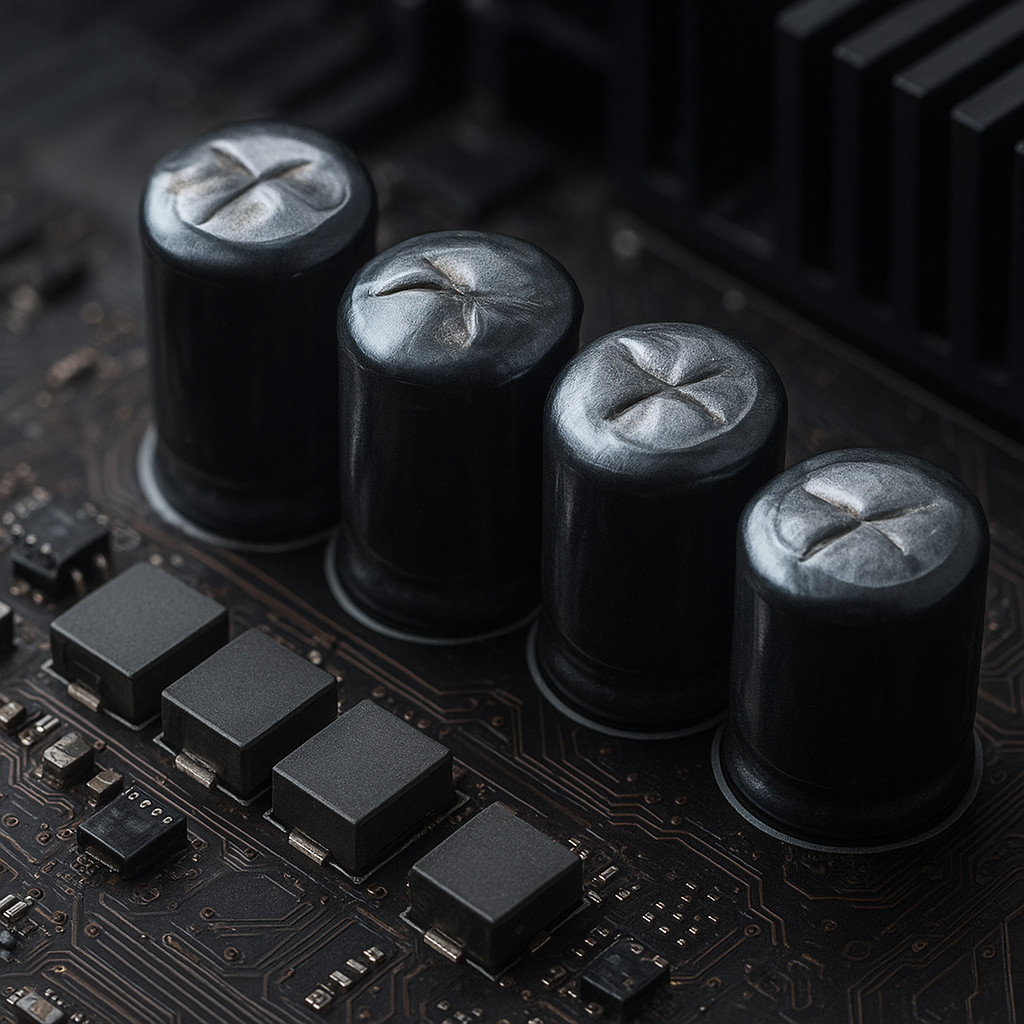
Typical Failure Symptoms
Obvious failures include domed or split vents, electrolyte crust around the can, or SMD cans that have shifted or corroded their pads.[web:25] Less obvious symptoms are random reboots under load, unstable memory behavior, “cold boot” issues, noisy or distorted onboard audio, GPU artifacts, or consoles that start and immediately shut down when VRM rails sag.[web:29]
A failed electrolytic often still measures close to nominal capacitance while its ESR has risen several times above the original datasheet limit, which dramatically increases ripple voltage and local heating in switch‑mode supplies.[web:20][web:23] A dedicated ESR meter that injects a low‑voltage, high‑frequency test signal (commonly around 100 kHz) can check many caps in‑circuit because the stimulus is too small to forward‑bias nearby semiconductors, though low‑impedance parts in parallel can still distort readings.[web:20][web:26]
Safety and Preparation
Always disconnect the device from mains, allow primary capacitors in PSUs and CRT equipment to discharge, and verify with a meter before touching any high‑voltage sections.[web:25] Use basic ESD precautions (wrist strap, grounded mat) when working on PC mainboards and GPUs to avoid latent damage to chipsets and VRM controllers.[web:21]
A temperature‑controlled soldering station, quality leaded solder, flux, desoldering braid, and isopropyl alcohol for cleanup are strongly recommended; lead‑free factory solder is harder to reflow and benefits from mixing in a small amount of leaded solder to reduce the melting point.[web:21][web:27] Pre‑warming dense multilayer boards with a hot‑air gun or preheater to around 80–100 °C significantly reduces the thermal stress on pads when removing large capacitors.[web:21]
Selecting Replacement Caps
For each position, you must match or improve on the original electrical stress ratings: never use a lower voltage rating, aim for equal or slightly higher capacitance, and choose at least a 105 °C temperature rating (or 125 °C for very hot environments).[web:16][web:25] Because electrolyte evaporation accelerates with temperature, higher temp‑rated series with longer endurance at 105 °C usually give much better real‑world life on hot VRM or PSU rails.[web:16][web:22]
In regulators and GPU VRMs that originally used low‑impedance aluminum electrolytics, pick modern low‑ESR, high‑ripple series explicitly specified for switching power supplies (check the datasheet tables for ripple current and impedance at 100 kHz).[web:29][web:10] When replacing caps in feedback‑compensated switch‑mode supplies, staying within roughly ±20–30 % of the original capacitance value per position is a good default to avoid upsetting control‑loop stability unless you have the design data.[web:29]
Conductive polymer capacitors replace the liquid electrolyte with a solid polymer, yielding much lower ESR, much higher ripple current capability, and much flatter characteristics over temperature compared with standard aluminum electrolytics.[web:4][web:15] This allows designers to use fewer capacitors for the same ripple target, and makes polymer parts an excellent upgrade on CPU and GPU VRM outputs where voltage ripple and thermal stress are severe.[web:4][web:9]
Film capacitors such as the KEMET R60 metallized polyester series are excellent for general‑purpose blocking, coupling, and interference suppression at higher voltages, but they are not drop‑in replacements for low‑voltage motherboard VRM bulk electrolytics and should not be used there.[web:2][web:5][web:8][web:11] For audio coupling or timing networks in consoles and sound cards, quality film capacitors or low‑leakage electrolytics can be appropriate, but their physical size and lead spacing must match the PCB footprint.[web:2][web:11]
Physical constraints matter as much as electrical ones: check lead spacing, body diameter, and maximum height against heatsinks and enclosures, and measure clearance under GPU shrouds or optical drives before ordering.[web:27] A cap that electrically fits but mechanically fouls a heatsink or metal shield can create shorts or trap heat and shorten its lifetime.[web:25]
Understanding ESR, Ripple and Lifetime
Equivalent Series Resistance (ESR) represents the resistive component in series with the ideal capacitor and directly sets how much ripple voltage appears for a given ripple current in switch‑mode supplies.[web:20][web:23] High ESR in an output cap forces the regulator to work harder, increases heat dissipation inside the can, and can lead to oscillations or voltage droop under load.[web:20][web:29]
Datasheets specify maximum ESR and ripple current versus frequency and temperature; polymer parts often support ripple currents up to several times higher than comparable electrolytics of the same size thanks to their much lower ESR.[web:4][web:15] Because power‑supply capacitor lifetime is dominated by electrolyte loss and self‑heating, designers use the “10 K rule” based on Arrhenius behavior: every 10 °C reduction in capacitor core temperature roughly doubles lifetime, so keeping caps cool has far more impact than marginal value tweaks.[web:16][web:22][web:28]
Step-by-Step Removal and Installation
Set a temperature‑controlled iron to around 330–360 °C for boards with leaded solder and toward the upper end of that range for lead‑free joints, adjusting based on tip size and thermal mass.[web:21][web:27] Adding a little fresh solder with flux improves thermal contact and mixes in leaded alloy, making stubborn factory joints flow much more easily.[web:21]
For through‑hole electrolytics, it is safest to desolder each lead separately: heat one pad while gently rocking the capacitor just enough to lift that side slightly, then heat the other pad and repeat until the part walks out, keeping individual heat applications short and letting the pad cool between them.[web:21][web:27] On very tight multilayer boards, many technicians instead cut the can off near the base and then desolder each remaining lead stump individually to avoid stressing the vias.[web:21]
For SMD polymer or electrolytic cans, use plenty of flux and either a hot‑air rework station set around 280–320 °C with gentle airflow, or a dual‑tip soldering iron that heats both end terminals at once to lift the part straight up.[web:21] Avoid prying up one side at a time with a single iron, as this commonly rips pads from the FR‑4 when the lead‑free solder has not fully reflowed.[web:21]
After removal, clean old solder and corrosion with braid and isopropyl alcohol, then tin the pads lightly so the new capacitor will sit flat and wet quickly.[web:21] When inserting a new through‑hole cap, form the leads so the body sits just above the PCB (not under mechanical tension), solder with a smooth fillet on both sides, and trim leads flush.[web:27]
Polarity and Visual Checks
The printed stripe on an aluminum electrolytic can always marks the negative terminal, while many tantalum parts instead mark the positive terminal with a “+” symbol, so always confirm the convention before removal.[web:18][web:30] On the PCB, polarity is usually indicated by a “+” symbol on the positive pad or by a shaded half of the silkscreen circle or bar on the negative side; pad shapes like squares or beveled outlines are often used for pin 1 or positive pads but are not standardized and should not be trusted without the silkscreen or schematic.[web:18][web:21][web:24][web:27]
Before soldering the replacement, align the capacitor so its polarity markings match the board’s symbols, then double‑check again after soldering every group of parts in case one was rotated during handling.[web:21][web:27] Installing a polarized capacitor backwards can cause rapid heating and venting on power‑up, particularly on higher‑voltage rails.[web:25]
Testing After Recap
Before first power‑up, visually inspect all joints for dull or cracked solder, verify that no pads have lifted, and confirm polarity for every replaced capacitor with fresh eyes or a second person if possible.[web:21][web:27] If you have an ESR or LCR meter, spot‑check a sample of the new capacitors out of circuit to confirm they meet datasheet ESR and capacitance before committing to a full recap run.[web:20][web:23]
On power‑up, monitor the main rails (e.g. 12 V, 5 V, 3.3 V, CPU Vcore, GPU core) with a multimeter, and ideally check ripple with an oscilloscope to ensure it is within expected limits for a healthy SMPS design.[web:20][web:29] Once the system POSTs, run sustained stress tests such as Prime95 for CPUs, FurMark or other GPU‑intensive workloads for graphics cards, and console‑specific test cartridges or ROMs for 30–60 minutes to verify that reboots, artifacts, and audio issues are resolved under full thermal load.[web:29][web:33]
During the first long test, periodically feel around the recapped area with the back of your finger or use an IR thermometer to check for any capacitor that runs significantly hotter than its neighbors on the same rail, which can indicate reversed polarity, incorrect part selection, or an underlying fault elsewhere.[web:20][web:25] Properly specified and installed replacement caps will generally remain only slightly warm in VRM areas and barely above ambient on lightly loaded rails.[web:4][web:25]